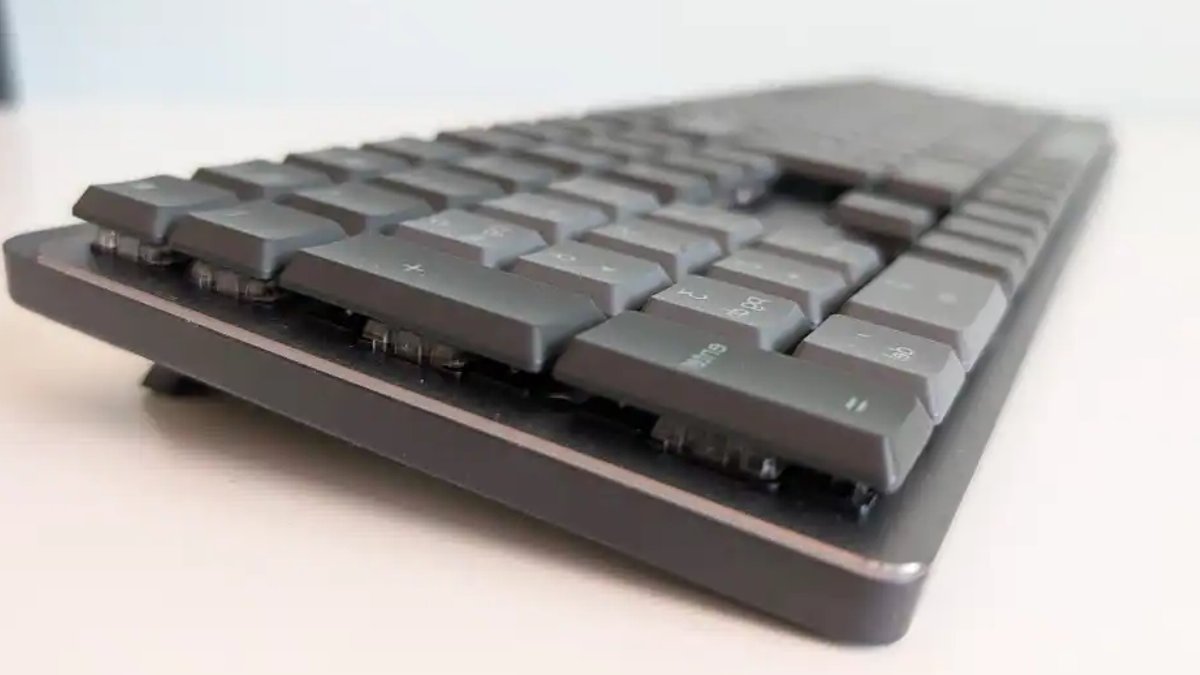
The Logitech MX Mechanical keyboard combines many strengths of Logitech’s flat keyboards but introduces a significant shortcoming: excessive noise. It preserves the brand’s recognizable design and functionality, yet its physical build generates more vibration and rattling than anticipated, even when using quiet switches.
Design and Build: A Familiar Profile with Height Adjustments
The MX Mechanical adopts the same layout as Logitech’s flat keyboards, featuring an 110% key arrangement that includes a dedicated numeric keypad and navigation cluster. Its grey-on-grey color scheme aligns with other models in the series, but the mechanical switches raise the keys above the surface, demanding wrist support for prolonged use. Unlike flat keyboards, these switches return to their original position after each press, a design intended to minimize typing errors.
The keyboard is solidly built with a metal plate on a plastic base. Fold-out feet at the back allow you to adjust the angle slightly.
Acoustic Performance: A Noticeable Weakness
The MX Mechanical provides three switch options: MX Tactile Quiet, Clicky, and Linear. While the Tactile Quiet switches suppress clicking sounds, the keyboard’s chassis still produces noticeable rattling during use. The suspension and frame lack vibration damping, which intensifies noise even with the quietest switches. The Clicky switches, highlighted in red, deliver a pronounced mechanical click—an irritation in shared environments.
Read Also: Mini PC Deals Deliver Performance and Savings
Backlighting offers seven brightness levels along with dynamic effects like waves and keypress reactions. However, the presence sensor automatically dims the lighting after approximately 30 seconds of inactivity to extend battery life. Though RGB options add visual appeal, many users prefer subdued lighting for a cleaner aesthetic.
Power Efficiency and Software Integration
The keyboard’s 1,500 mAh battery maintains performance for roughly 15 days with regular use and backlighting enabled, according to Logitech. Independent tests confirmed a 20% battery drain over three days, matching the manufacturer’s estimates. The Logitech Options software, essential for full functionality, supports multiple operating systems, including Windows, Mac, Chrome OS, Android, iOS, and Linux.
Automatic operating system detection removes the need for manual adjustments when switching between Windows and Mac. The top row incorporates shortcuts for emojis, quick searches, and context menus, improving workflow efficiency without compromising usability.
Balancing Strengths and a Critical Shortcoming
Despite the acoustic drawbacks, the MX Mechanical retains Logitech’s signature design and software capabilities. Priced at $159.99, it reflects its premium features, though the trade-off between performance and sound may discourage some potential buyers. For those prioritizing layout and software over silence, the keyboard remains a strong option.